|
DATA DOWNLOAD FILE FORMAT HELP
|
AERONET Data File Format Help
Zip Files*
|
The AERONET Download Tool provides data in a compressed
or "zip" file. This file can be uncompressed
or "unzipped" in a number of ways.
The table below shows the operating system and the
possible software or command that can be used to "unzip"
the zip file.
|
| Operating
System |
Possible
Software or Command |
| Unix |
Command: unzip |
| Windows |
Software*: Pkunzip,
Winzip, Winrar, Alladin Stuffit Expander |
| Mac |
Software*: Alladin Stuffit Expander
|
|
Data Files*
|
AERONET data files (*.lev10, *.alm, *.siz, *.ssa,
etc.) can be opened in Microsoft Excel, Corel Quattro
Pro, or similar spreadsheet program.
The following images show how to import the file
into a spreadsheet program.
|
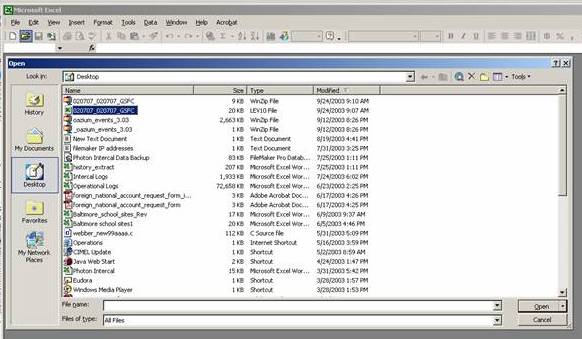
| These data files can be opened
from the spreadsheet program (Figure 1). |
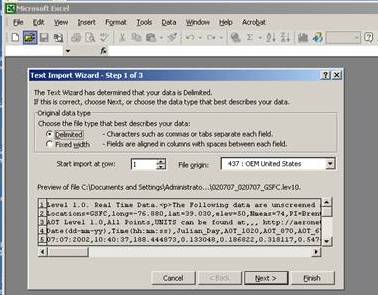
The text import wizard will should
be set to "delimited" format (Figure
2) |
Next, select comma delimited in
the text import wizard (Figure 3). |
 |
 |
 |
| Figure 1: Opening the
AERONET data file |
Figure 2: Setting the
delimited data format |
Figure
3: Setting the data separator |
| Furthermore, set the first column
date format to day/month/year or DMY (Figure 4). |
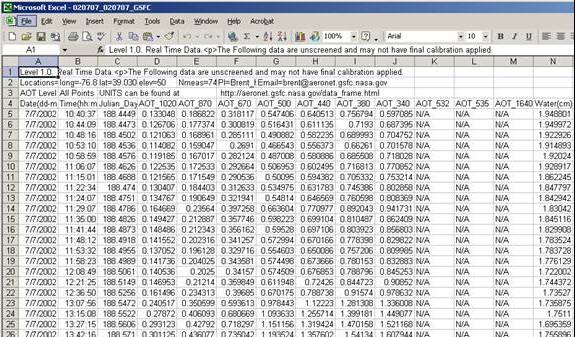
The data now appear properly formatted
in the spreadsheet (Figure 5). |
|
 |
 |
| Figure 4: Setting the proper date
format |
Figure 5: Parsed AERONET
data file |
|
|
The data import can be automated by recording macros.
The software documentation will provide additional
assistance in creating a macro.
*Note: NASA does not endorse any particular software
program.
|
|
|
 |
|
 |
Curator:
NASA Official:
Last Updated: 26 February 2004Thursday, 25-Jan-2024 10:45:38 EST
|
|




;)
;)
;)
;)
;)